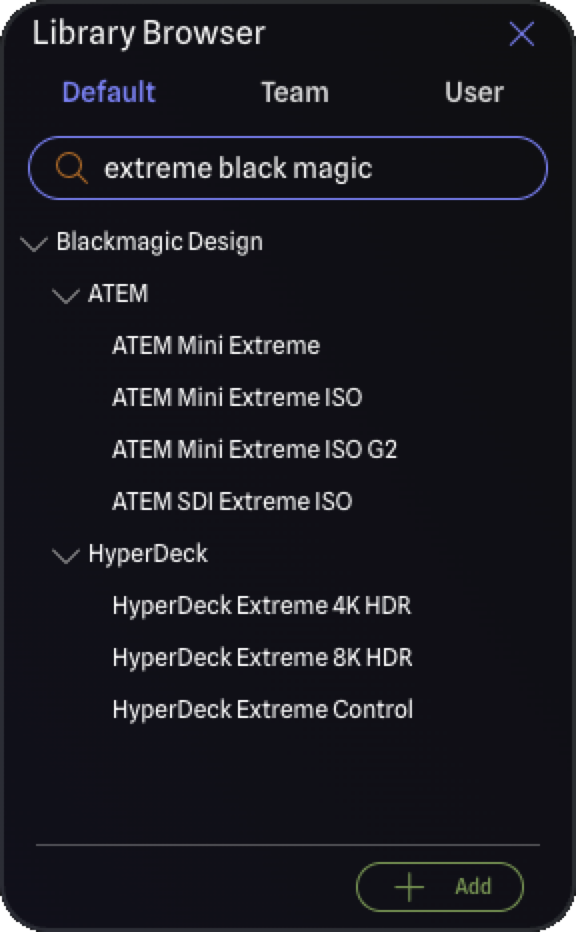
Finding the right gear is now significantly more flexible. Search in the Library Browser and My Gear no longer expects a perfect, exact match. If you mistype a model name, search still surfaces what you are looking for, so a small slip on the keyboard no longer means starting over.You can also combine everything you know about a piece of gear in one search. Type the manufacturer and the model together and the results narrow straight to the match. Searching disguise gx3, for example, takes you right to the Disguise GX 3. The terms can go in any order, so gx3 disguise works just as well, and you are free to mix and match the manufacturer, brand, and model however they come to mind. Spacing is flexible too, so gx3 and gx 3 both find the same gear.
Search also understands numbers and singular and plural forms. Whether you enter a model number exactly as it appears on the device or a slightly different variation, and whether you search a term in its singular or plural form, the gear you expect shows up. The result is less time hunting through the library and more time building your drawing.
New Port Options
New Connectors
IEC C13
IEC C14
IEC C19
IEC C20
har-link
Aviation 4-Pin
New Signal Types
Light Sensor
When you add one of the IECs to a gear item in the Library Editor, the port direction is set for you automatically, so a device's mains inlet and a distro's supply outlet come out correct without any extra steps. Matching IEC pairs (C13 with C14, and C19 with C20) are recognized as directly compatible, so those power connections work as expected when you draw them.
Signal Compatibility
USB-C Thunderbolt can now connect to HDMI ports, and vice versa.
Default Library Updates
Thank you to everyone who has submitted and requested library items! We have now passed over 2,700 verified gear items, thanks to you!